


Running an Airbnb rental yourself means you're basically operating a tiny hotel. There's pricing to optimize, guests to message at all hours, cleaners to coordinate, and a hundred other tasks that can consume your entire week.
Most self-managing hosts don't realize this: the right automation tools can handle 70% of your daily work while actually improving your guest experience and revenue. You just need to know which tools matter (and which are expensive distractions).
This guide shows you exactly how to automate your short-term rental operations in 2026. No fluff, no sponsored recommendations. Just the automation stack that actually works for self-managers.
What Problems Do Airbnb Automation Tools Solve?
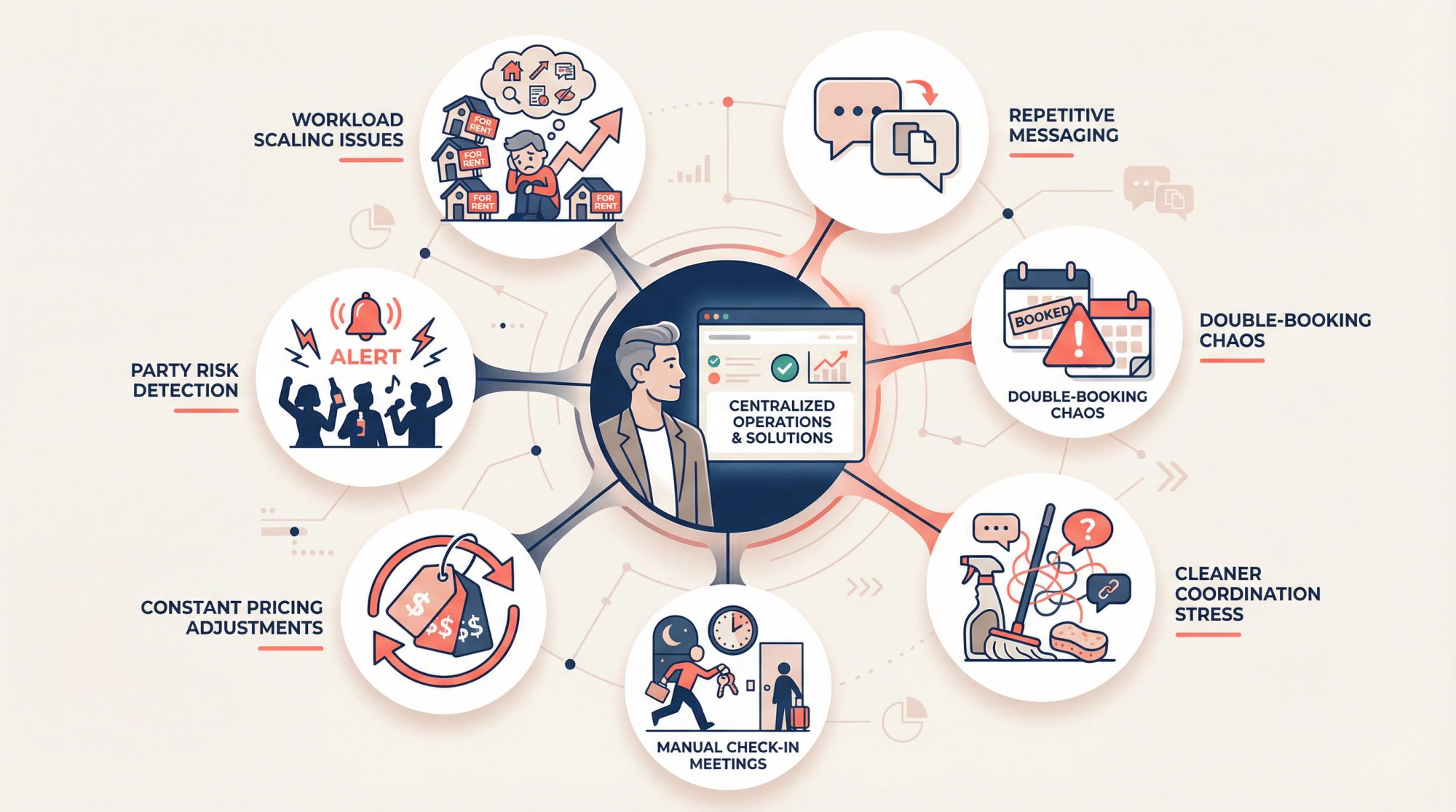
When hosts search for "Airbnb automation tools," they're not shopping for software. They're trying to solve specific problems:
• Stop writing the same "here's the wifi password" message 100 times a month
• Prevent double-bookings when listing on multiple platforms
• Coordinate cleaner schedules without constant back-and-forth texting
• Enable self check-in so you don't need to meet every guest personally
• Keep your pricing competitive without manually adjusting rates every day
• Detect potential party situations before neighbors start calling
• Scale from one listing to three (or five) without your workload tripling
The goal isn't automation for automation's sake. You want the same quality guest experience with dramatically less manual work.
Why Use Airbnb Automation? Revenue & Time Savings Data
The numbers tell a clear story about what automation delivers.
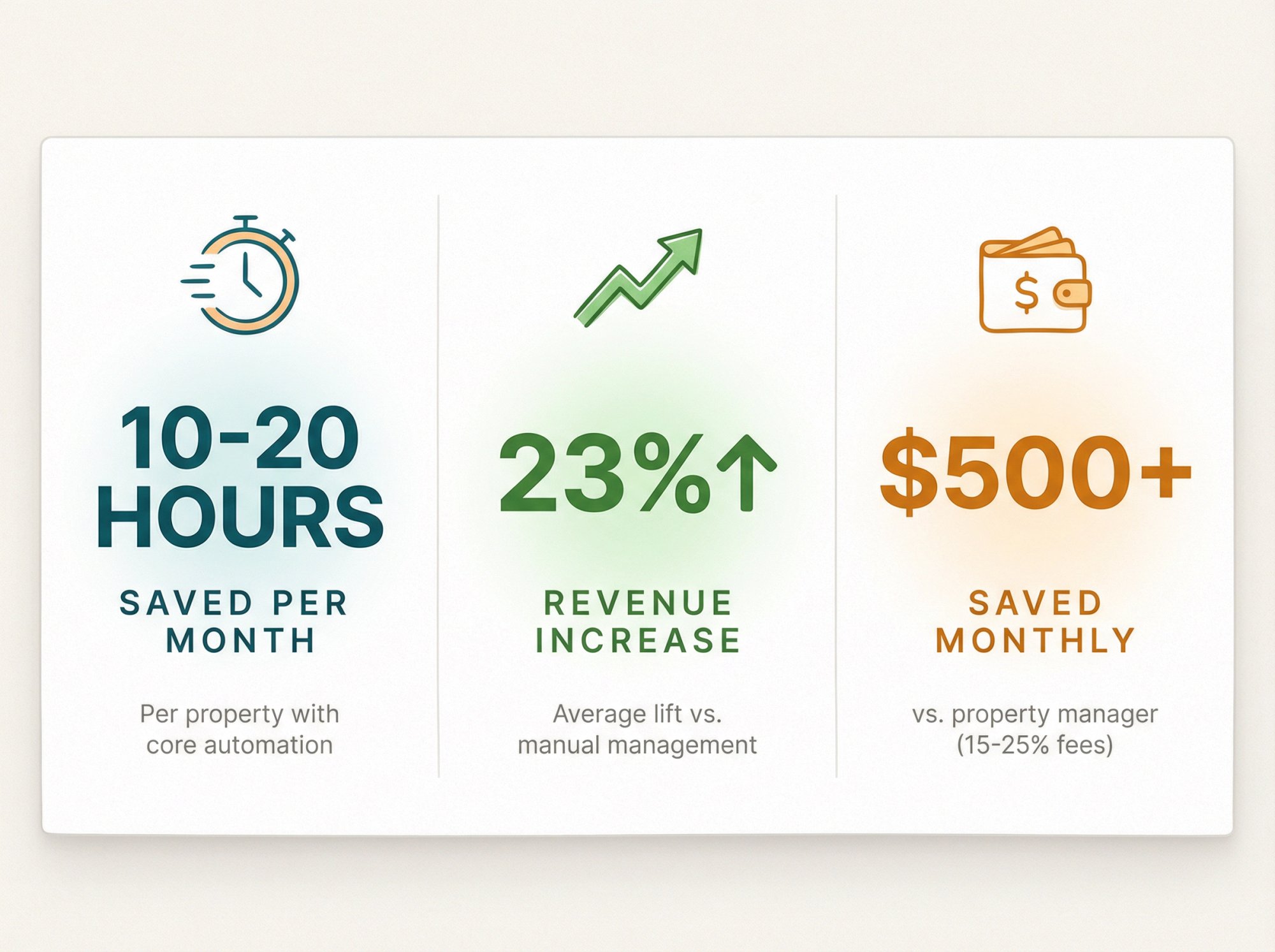
Time savings are substantial. Self-managing hosts save an average of 10 to 20 hours per month per property when they set up core automation tools. That's not marketing hype. It's the difference between spending your evenings answering "where's parking?" messages versus having systems handle it automatically.
Revenue increases are real. Hosts who use professional STR automation tools earn 23% higher revenue on average compared to purely manual management. Dynamic pricing alone typically boosts income by 15 to 25%, with some hosts seeing up to 40% more earnings during peak seasons.
The alternative is expensive. Traditional Airbnb property management companies charge 15 to 25% of your rental income every month. For a property earning $4,000 monthly, that's $600 to $1,000 going to a manager. Your entire automation tech stack? Usually under $300 total, often closer to $100 for a single listing.
One host we know runs two units grossing $9,000 per month and spends only about six hours monthly on actual management work. The rest runs on autopilot through automated systems. That's what's possible when you set things up correctly.
Free Airbnb Automation Features Built Into the Platform
Before buying anything, maximize Airbnb's built-in automation. You'd be surprised how much is already available at no cost.
Quick Replies and Scheduled Messages
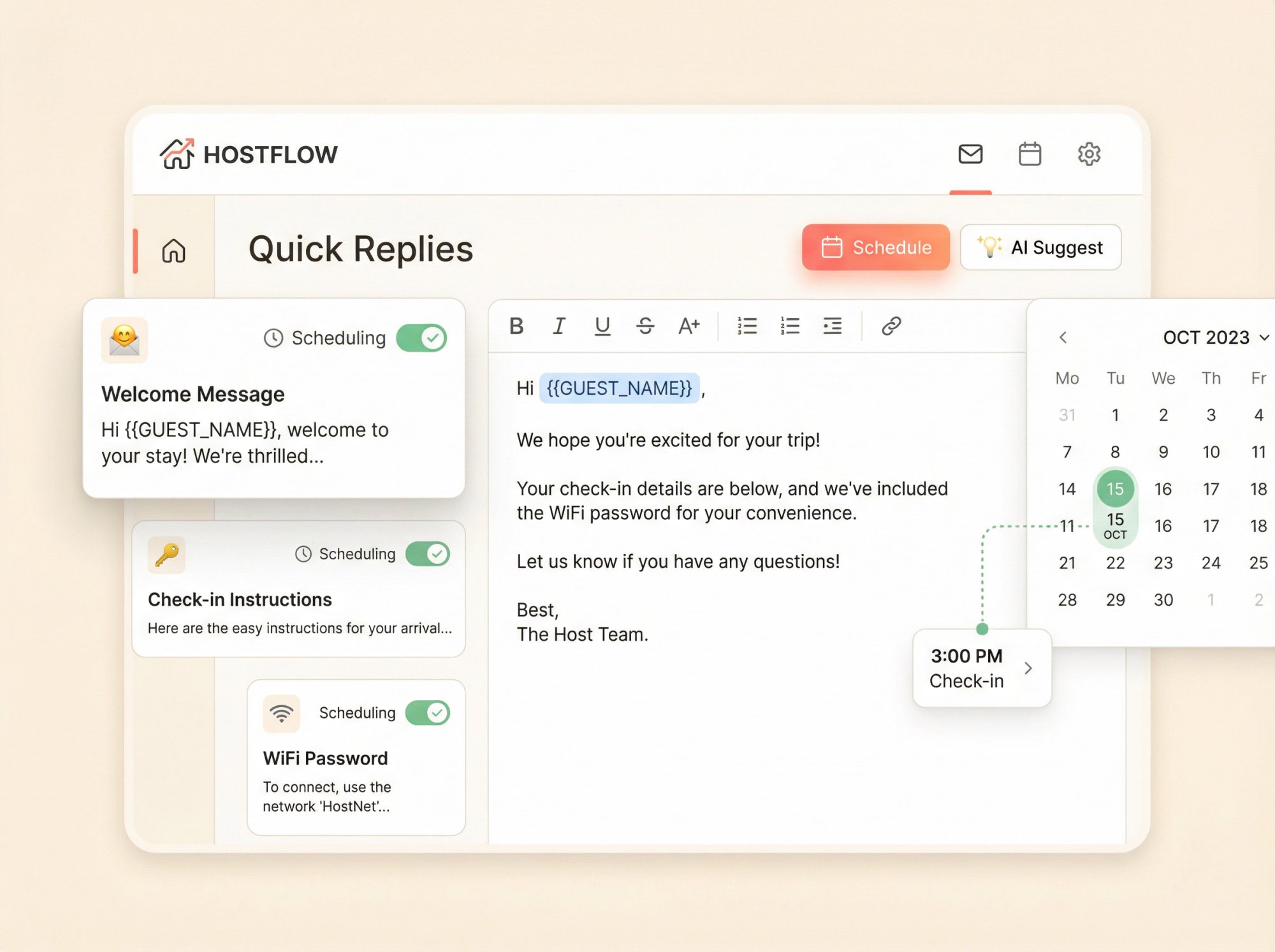
Airbnb's quick replies feature lets you save message templates that insert guest-specific details automatically (names, dates, check-in instructions). You can also schedule these to send at specific times, like 24 hours before check-in or right after booking confirmation.
The character limit is 4,000 characters, which is plenty for most messages. Airbnb even offers AI-suggested replies now for common guest questions.
What this handles: Welcome messages, wifi passwords, check-in instructions, checkout reminders, review requests. Basically all the repetitive communication that used to consume your evenings.
Professional Hosting Tools
If you manage multiple listings, Airbnb's professional hosting tools add features like multi-calendar view, rule-sets you can apply across properties, task management, and occupancy tax automation.
This is the simplest way to standardize settings without introducing third-party software risk. It's also free.
When Do You Need Paid Airbnb Automation Tools?
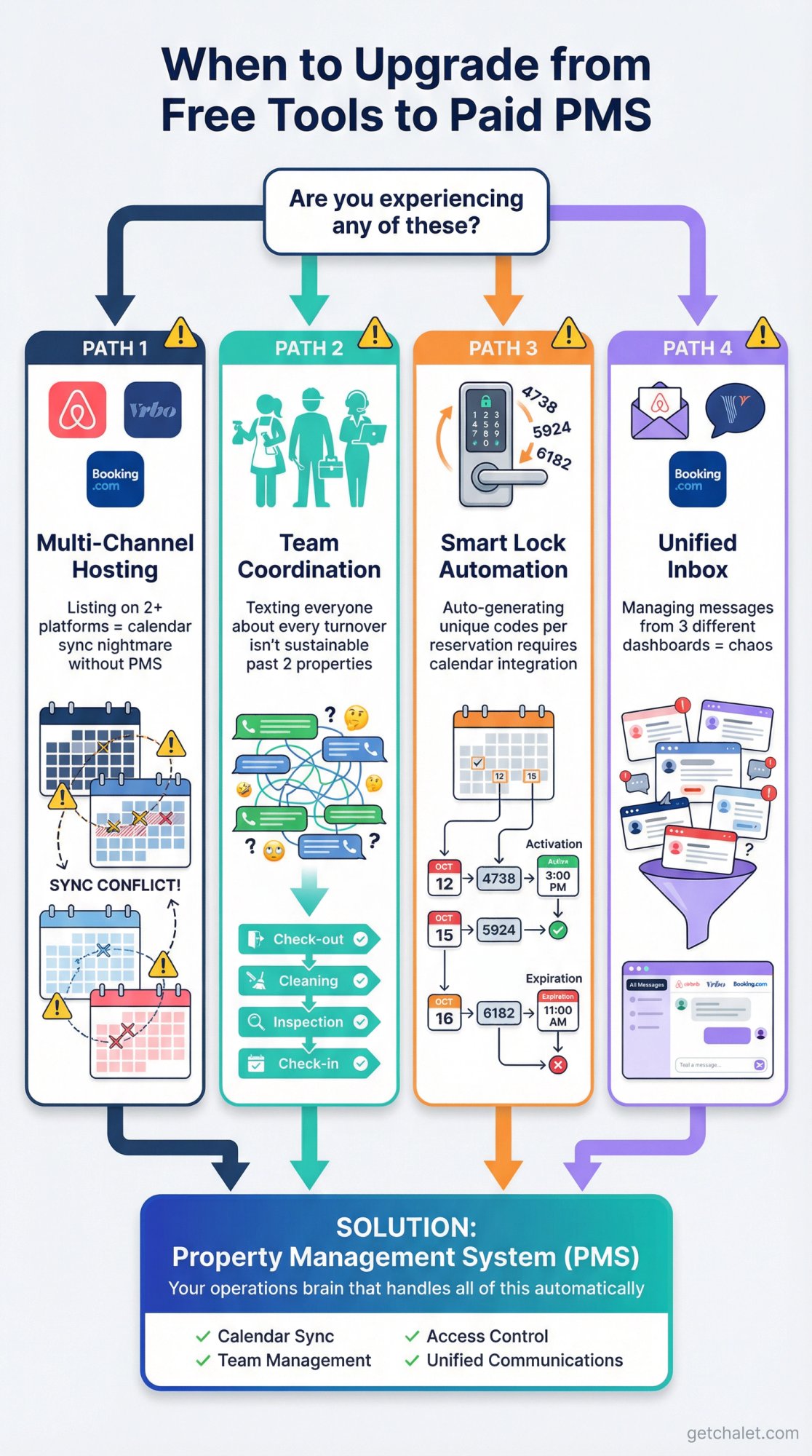
You'll know it's time for dedicated tools when:
You list on Vrbo or Booking.com in addition to Airbnb. Multi-channel hosting creates synchronization nightmares without proper software. One missed calendar update means a double-booking disaster.
You hire cleaners, handymen, or co-hosts. Team coordination becomes the bottleneck fast. Texting everyone about every turnover isn't sustainable past one or two properties.
You want smart lock automation. Generating unique door codes for each reservation that activate and expire automatically requires integration between your calendar and access control system.
You need a unified inbox. Managing messages across Airbnb, Vrbo, and direct bookings from three different dashboards is chaos.
That's when you move from basic platform features to a property management system (PMS) as your operations brain.
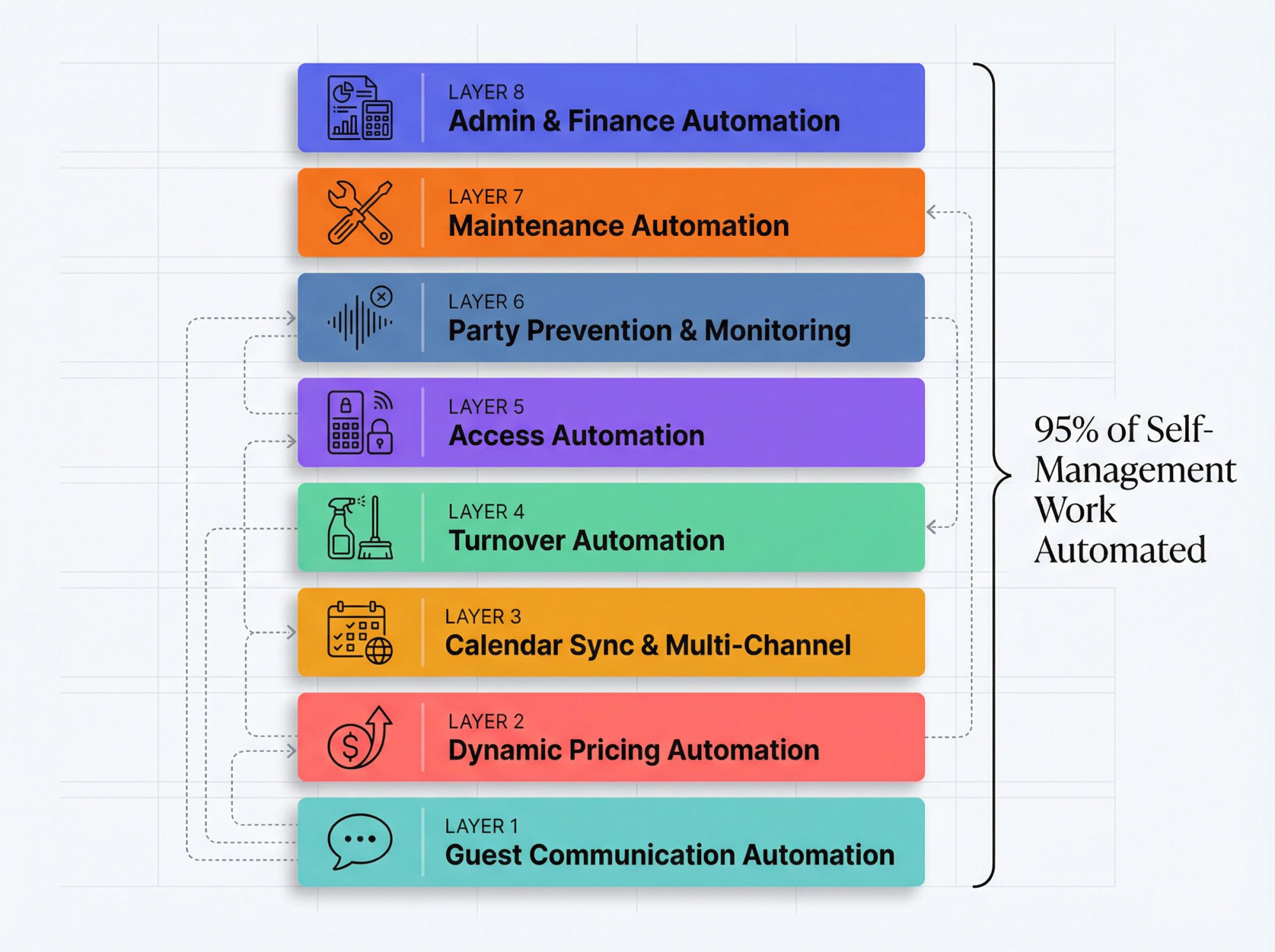
Complete Airbnb Automation Stack: 8 Essential Layers
The complete automation architecture that handles 95% of self-management work.
You don't need all eight layers on day one, but understanding the full stack helps you prioritize.
Layer 1: Guest Communication Automation
The problem: Guests ask the same questions constantly. You need to respond quickly to maintain your Superhost status, but you also need to sleep occasionally.
The solution: Automated messaging workflows that send the right information at the right time, every time, without you touching anything.
Set up an 8-message automation sequence that covers the entire guest lifecycle:
① Booking Confirmation (sends instantly): Confirms dates, guest count, and key house rules
② Pre-Arrival Checklist (48 hours after booking): Requests arrival time and final guest count
③ Check-In Instructions (24 hours before arrival): Door code, parking details, wifi, thermostat basics
④ Day-of Reminder (morning of check-in): Resends core details because guests always lose them
⑤ First-Night Check (evening of arrival): "Everything working okay? Anything missing?"
⑥ Mid-Stay Message (only for 5+ night stays): Trash day reminders, restock offers
⑦ Checkout Instructions (night before departure): The five non-negotiables (lock door, take trash out, start dishwasher, etc.)
⑧ Review Request (24 to 48 hours after checkout): Polite ask for a review, no guilt trip
Tools that do this well:
Property management systems like those on Airbnb's Preferred Partners list include unified inbox across all platforms, AI-assisted smart replies that detect and answer common questions instantly, and guest portals. If someone asks "Can I check in early?", the system responds with your pre-set early check-in policy automatically.
The result: You maintain a near-100% response rate without being glued to your phone. Every guest gets check-in info on schedule. You never forget to send anything. Your guests think you're incredibly responsive, but you're actually doing almost nothing manually.
Layer 2: Dynamic Pricing Automation
The problem: This is where most self-managers leak serious money. Manually updating prices for seasonality, local events, weekends, and last-minute availability is impossible to do well. Prices too high leave you with empty nights. Prices too low leave thousands on the table annually.
The solution: Dynamic pricing software that adjusts your nightly rate based on real-time market data, competitor pricing, local events, booking lead time, and your property's performance.
These tools analyze dozens of factors and update your rates daily (or even hourly). The algorithms are sophisticated. Hosts using dynamic pricing see 15 to 25% revenue increases on average, with some reporting up to 40% more income during high-demand periods.
Current pricing models in 2026:
Many property management systems include built-in dynamic pricing that's often good enough for hosts just starting out. Before investing in standalone pricing tools, check if your PMS already includes this feature.
At around $15 to $20 per month per listing, standalone pricing tools typically pay for themselves with one or two better-priced nights.
Set Guardrails Before Turning Anything On
Dynamic pricing isn't "set it and forget it." You need boundaries:
→ Minimum price: Below this, you'd rather leave the night empty
→ Maximum price: Prevents algorithmic accidents that scare away bookers
→ Minimum stay rules: By season (weekends vs. weekdays, peak vs. off-peak)
→ Last-minute discount limits: Don't crater your rates just to fill tomorrow
→ Gap-night rules: Avoid single-night holes that are hard to book
If your pricing tool can't put these specific rules in place, it's not actually an automation tool. It's just guessing at numbers.
Layer 3: Calendar Sync and Multi-Channel Management (Your PMS)
The problem: If you list on Airbnb, Vrbo, and Booking.com (which you should, to maximize exposure), keeping calendars synchronized is critical. A double-booking costs you hundreds in cancellation fees, horrible reviews, and guest frustration.
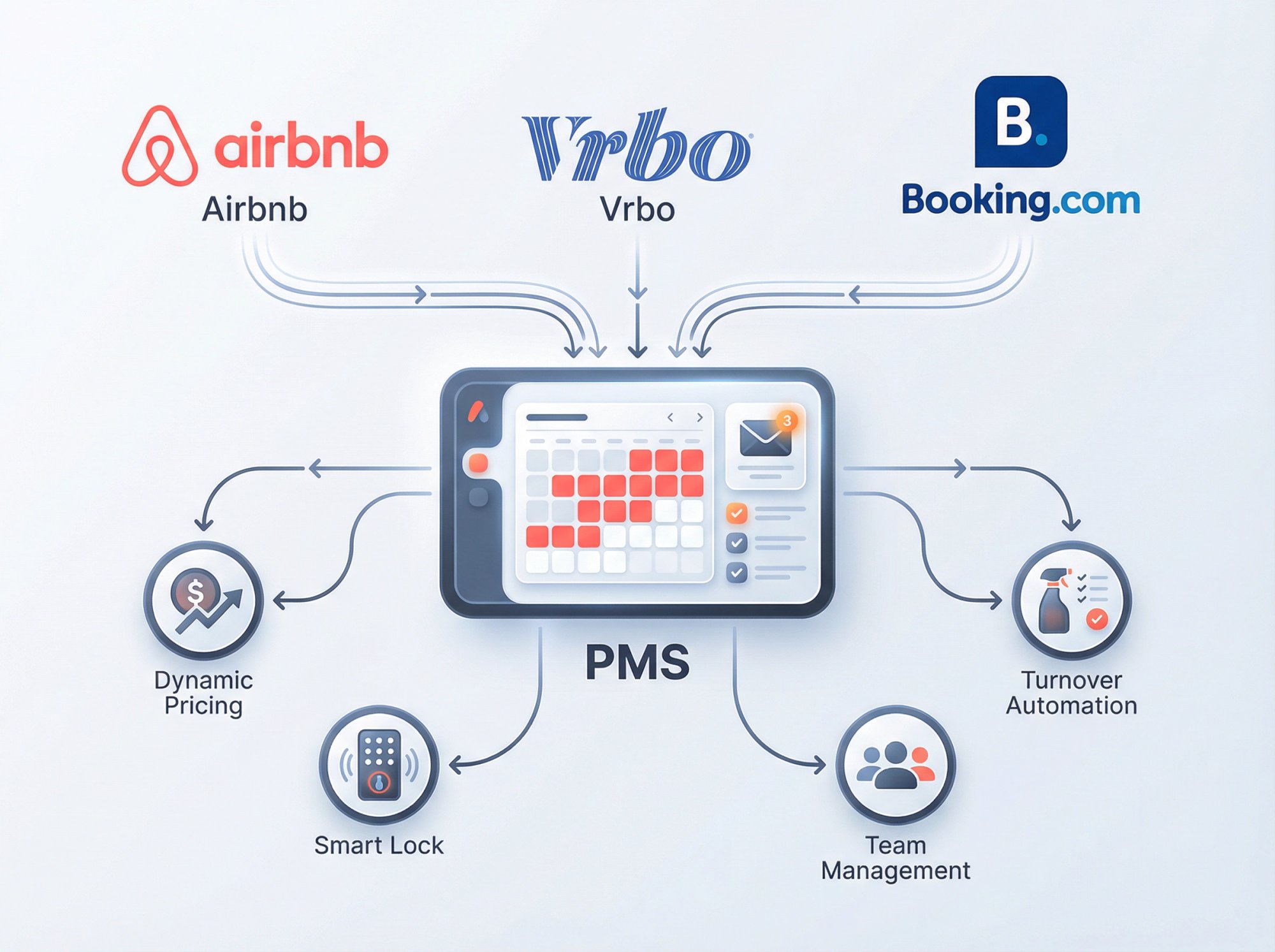
The solution: A property management system that syncs bookings and availability across all platforms in real time. When someone books your place on Airbnb, those dates instantly block on Vrbo and Booking.com.
What a good PMS handles:
• Unified calendar across all platforms
• Combined inbox for messages from every channel
• Automated messaging workflows
• Team management (give cleaners and co-hosts limited access)
• Task assignment and tracking
• Owner reports and financial statements
• Integration with pricing tools, smart locks, and cleaning schedulers
Top PMS options for self-managers:
Systems on Airbnb's 2025 Preferred+ Software Partners list are robust platforms favored for multi-unit portfolios. These meet higher integration standards and undergo quality and security reviews.
Some PMS charge around $0.80 per booking night for full features. Compare that to traditional property managers charging 15 to 25% of total revenue. The math is obvious.
The key advantage: you only update things once. Change your house rules or pricing strategy in the PMS, and it propagates everywhere. All messages appear in one inbox. You're essentially using the same software professional management companies use, but you keep control and the profits.
Layer 4: Turnover Automation (Cleaning and Inspection)
The problem: Most hosts think guest messaging is the hard part. Actually, it's turnovers. Coordinating cleaners for same-day flips, ensuring quality, and tracking completion is where things fall apart operationally.
The solution: Automated turnover systems that create cleaning tasks the moment a reservation is made, notify your cleaning team, require photo verification when complete, and alert you if something's not done on time.
The setup that works:
→ Auto-create cleaning task for every checkout
→ Require photo checklist verification (bathrooms, kitchen, linens, supply restock)
→ Auto-message cleaner if it's a same-day turnover situation
→ Auto-message you if checklist isn't completed by your cutoff time
Turnover automation platforms are the standout tools here. They've positioned themselves as the turnover automation standard for self-managers.
Many offer free tiers for single properties and integrate with Airbnb's partner network to auto-assign your preferred cleaners for new reservations.
Results: Hosts save 5 to 10 hours monthly on turnover coordination and eliminate the nightmare scenario of a guest arriving to a dirty property because someone forgot to communicate the schedule.
Layer 5: Access Automation (Smart Locks and Entry Codes)
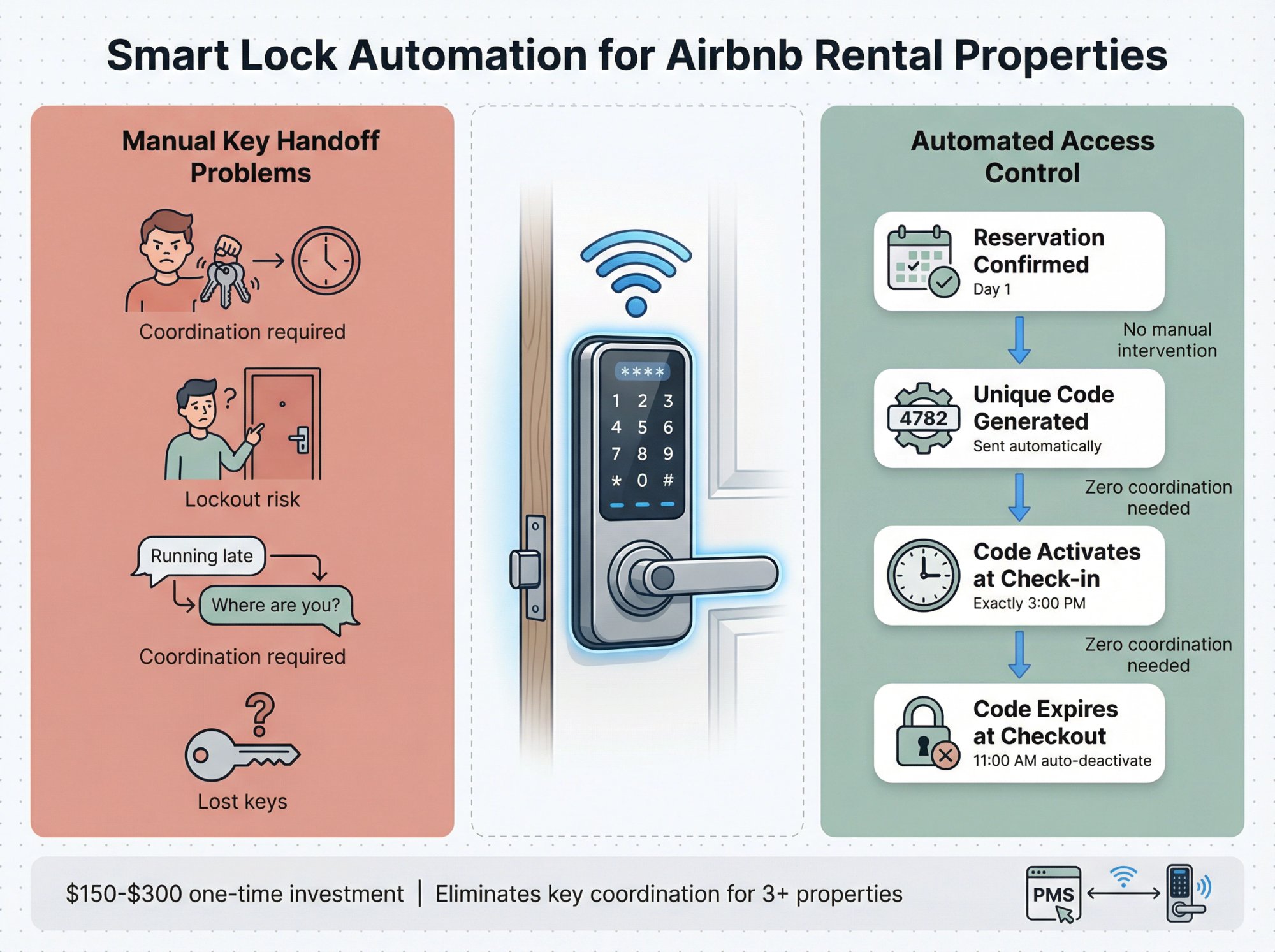
The problem: Meeting every guest to hand over keys is unsustainable. Lost keys, lockouts, and coordinating arrival times drain your energy fast.
The solution: Smart locks that generate unique entry codes for each reservation, activate at check-in time, and expire at checkout. Self check-in is now a standard filter guests use when searching, so this isn't optional anymore.
Your goal:
• Unique code per reservation (not one code for everyone)
• Code activates exactly at check-in time
• Code expires at checkout
• Backup plan if the lock dies (physical lockbox, for example)
Smart lock options: August, Yale, Schlage Encode, Kwikset Halo all integrate well with Airbnb or via your PMS.
For multi-property hosts or remote managers, enterprise access control systems offer centralized management.
Many PMS include smart lock automation as part of their platform, with some offering device integration at no additional cost or small monthly fees per additional device.
Costs: A quality smart lock is a $150 to $300 one-time investment. It's essential infrastructure for modern rentals. You get time-sensitive codes, remote monitoring of check-in/out activity, and flexibility for guests who arrive at midnight.
Rule of thumb:
• 1 to 2 listings: A solid keypad lock with manual code rotation works
• 3+ listings or remote hosting: Automated code generation becomes mandatory
Layer 6: Party Prevention and Privacy Compliance
The problem: Neighbor complaints, property damage, and local regulation violations can end your STR business fast. But you can't monitor your property 24/7, and you definitely can't violate guest privacy.
The solution: Privacy-compliant monitoring tools that detect issues early so you can intervene before things escalate.
Know the Rules First
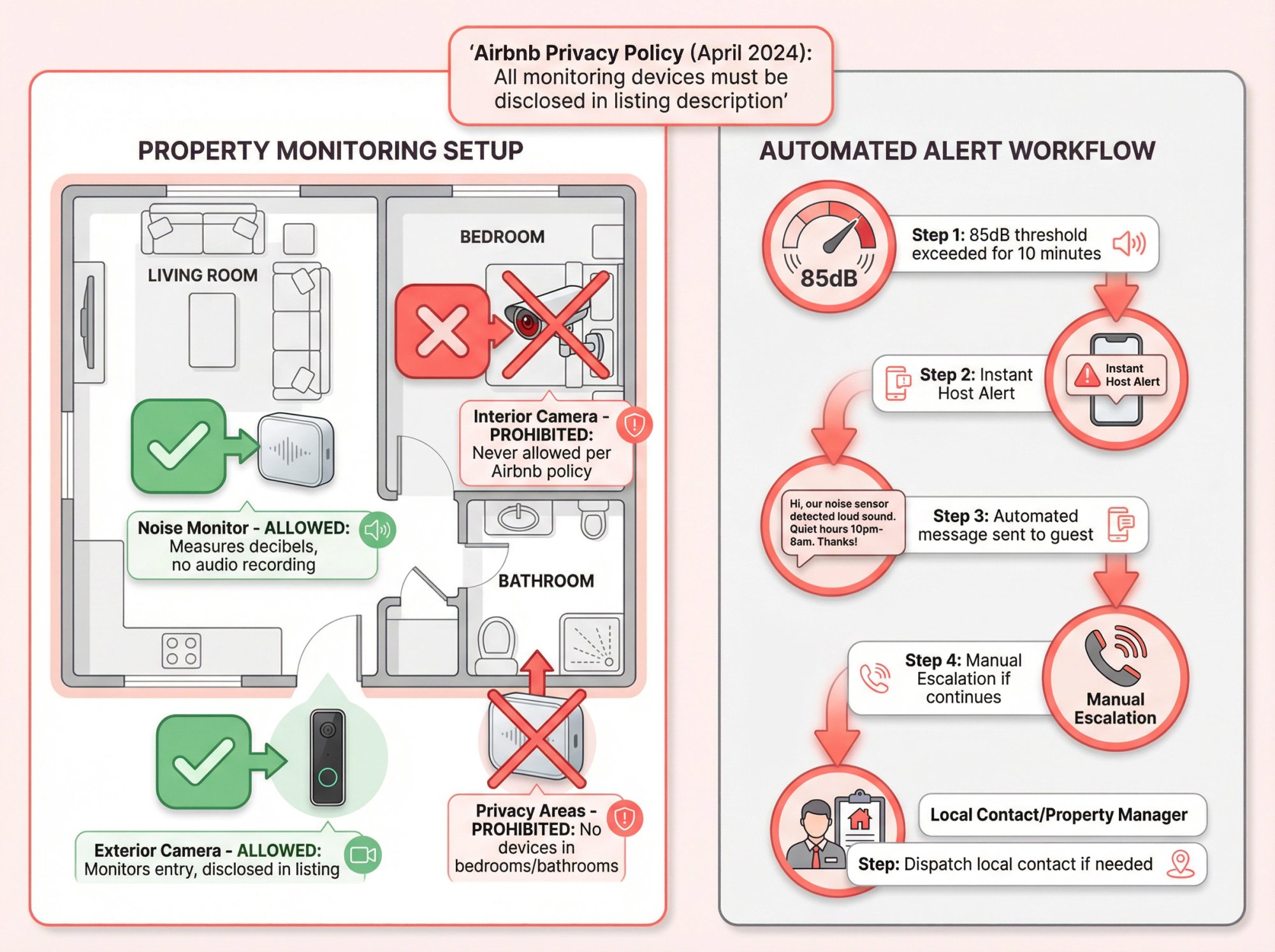
Airbnb's device policy (effective April 30, 2024) is strict: No security cameras or recording devices that monitor any interior space, even if turned off.
Noise monitors are allowed if they meet specific conditions:
• They measure decibel levels but do not record audio
• You disclose them in your listing description
• They're not in bedrooms, bathrooms, or sleeping areas
Disclosure isn't optional. If you use these devices, you must state it clearly.
What you can automate:
Noise monitoring: Devices that track sound levels without recording conversations distinguish normal background noise from sustained loud noise (like a party). When decibel levels exceed your threshold for a certain duration, they trigger alerts.
Many hosts program an automated guest message first: "Hi, our noise sensor is detecting loud sound. Please remember quiet hours start at 10pm. Thanks for being considerate."
If it continues, you escalate to a phone call or local contact.
Exterior cameras: Ring video doorbells or driveway cameras can monitor entrances without violating privacy. You see when cleaners arrive, when guests check in, and can detect if significantly more people show up than booked.
The automation recipe that works:
• If noise crosses threshold for X minutes, send friendly automated warning
• If it persists, manual escalation (call guest, then dispatch local contact if needed)
Results: You get peace of mind managing remotely. If a rogue guest tries to throw an unauthorized party, you're alerted at 11pm and can address it before it becomes a $5,000 damage situation or a neighbor calling the police.
Layer 7: Maintenance Automation
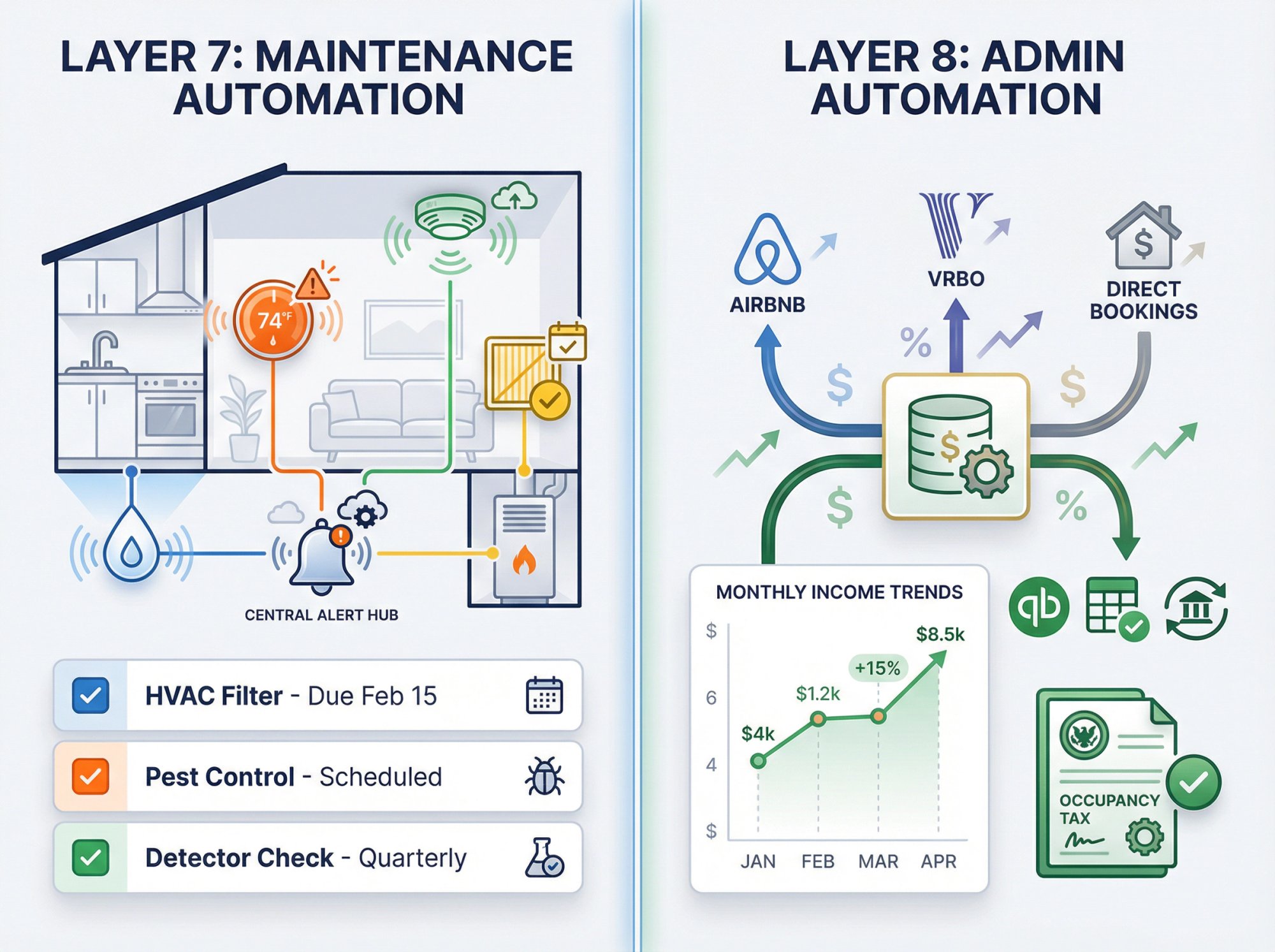
The problem: Small issues become expensive disasters when ignored. HVAC filters get forgotten, water leaks go undetected, preventive maintenance never happens because you're busy with guest messages.
The solution: Two parallel systems.
System 1: Preventive maintenance schedule (automated reminders)
-
HVAC filter replacement (monthly or quarterly)
-
Hot tub service (weekly if applicable)
-
Pest control (monthly or quarterly)
-
Smoke and CO detector battery checks (quarterly)
-
Deep cleaning (monthly or quarterly)
Connect these to your PMS task system or turnover tool so they're visible and tracked, not just in your head.
System 2: Issue detection and intake
-
Water leak sensors that alert you instantly
-
Smart thermostats that detect HVAC malfunctions or extreme temperatures
-
WiFi-connected smoke/CO alarms
-
Guest-reported issue workflow (guest reports, creates task, assigns to handyman, tracks completion)
A $30 water leak sensor can save you thousands in flood damage by catching a dripping water heater early. A smart thermostat might alert you that your AC isn't cooling properly before your next guest arrives to a 90-degree house.
Layer 8: Admin Automation (Money, Taxes, Reporting)
The problem: Hosts quietly lose hours each month on receipts, payout reconciliation, occupancy taxes, and expense tracking. It's boring work that still needs to happen.
The solution: Streamlined financial systems with minimal manual entry.
Airbnb's professional hosting tools include occupancy tax features for eligible hosts. Many PMS platforms emphasize accounting integrations like QuickBooks connectivity for streamlined bookkeeping.
For first-time STR investors, keep this simple:
• Separate bank account and credit card for the business
• Export monthly statements (or use accounting software that auto-syncs transactions)
• One source of truth (don't double-enter data manually)
As you scale, consider tools like QuickBooks Self-Employed or Landlord Studio specifically designed for rental property accounting.
Advanced Airbnb Automation Features (Optional)
Guest Experience Enhancements
Digital guidebooks preempt dozens of "where's the coffee maker?" questions. Services that let you create beautiful online guides with property info, local recommendations, and house instructions improve the guest experience. Send the link in your automated welcome message. Guests help themselves, you field fewer questions, reviews improve.
Review automation: Some platforms can auto-post a predetermined guest review shortly after checkout, saving you mental energy and encouraging reciprocal reviews.
Marketing and Direct Booking
Custom WiFi solutions provide a login splash page for your rental. When guests connect, it captures their email address (fully legal and disclosed). You collect contacts from everyone staying, not just the person who booked.
Then you can run automated email campaigns: a thank-you with a direct booking discount a few days after checkout, or a "we miss you" campaign six months later.
Over time, you build a loyal guest base that books directly, saving you 15%+ in OTA fees and stabilizing occupancy during slow seasons. This is more advanced (set it up after your core operations are automated), but the lifetime value increase per guest is substantial.
How Chalet Helps You Build and Optimize Your Automation Stack
At Chalet, we built our platform specifically for self-managing Airbnb and short-term rental investors who want the control and profit margins of self-management with the efficiency of professional operators.
What We Provide (All Free)
Market analytics and dashboards: Our free market analytics show you ADR (average daily rate), occupancy rates, and revenue trends across dozens of markets. No paywall, no subscription required. You get the same data institutional investors use to make decisions.
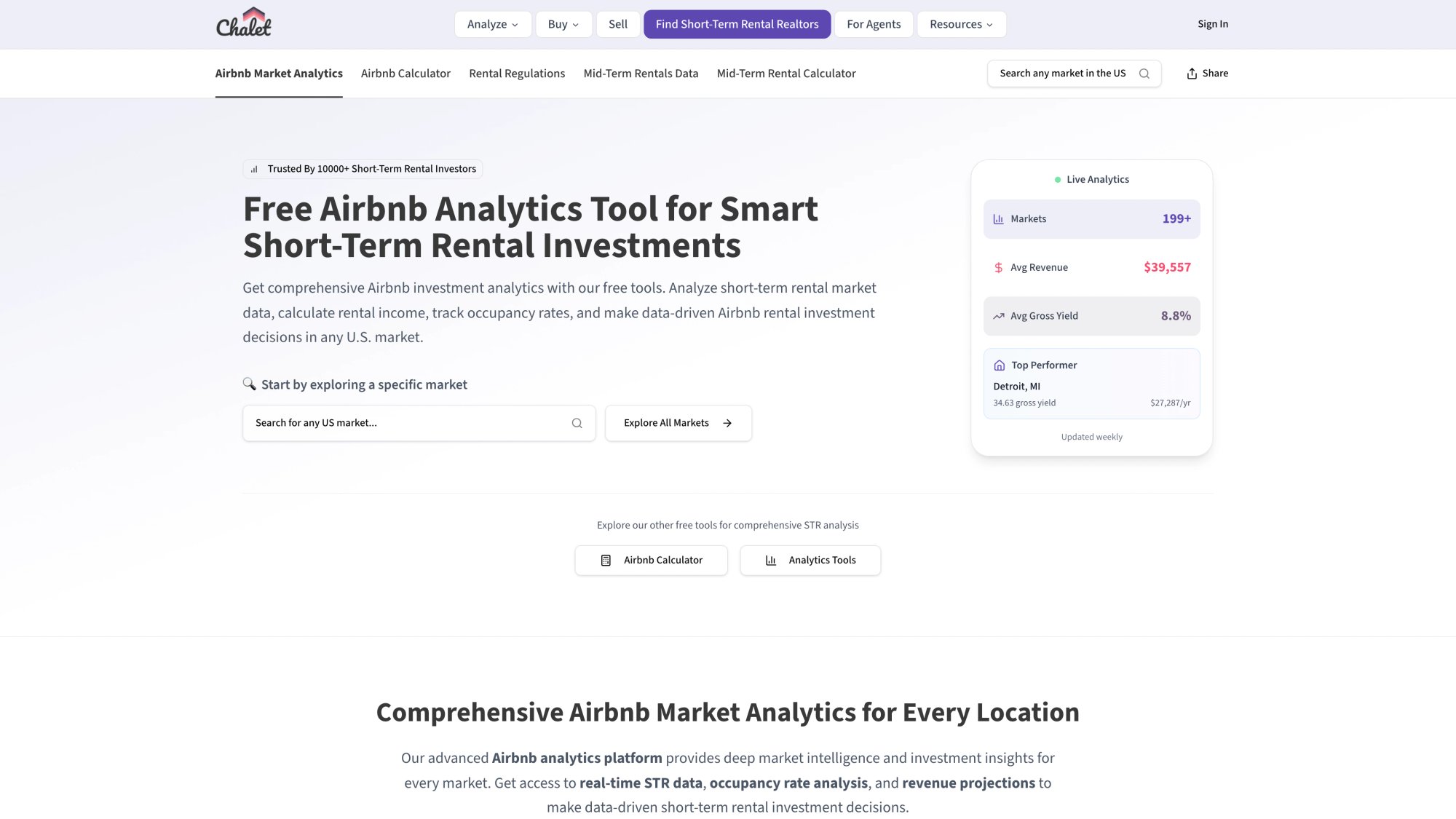
ROI and DSCR calculators: Before you buy a property or set up expensive automation, run the numbers to see if the deal actually works. Our calculators factor in realistic revenue projections, operating expenses, and financing structures.
Vetted vendor network: Once you're ready to execute, we connect you with STR-specialist vendors who actually understand short-term rentals:
• Real estate agents who know which properties work for Airbnb (and which local regulations kill deals)
• DSCR and conventional lenders who can finance investment properties quickly
• Insurance providers who specialize in STR coverage (your homeowner's policy won't cover this)
• Property managers if you decide automation isn't enough and you need human help
• Furnishing services, cleaners, and handymen who work with STR hosts regularly
We only earn referral compensation when you choose to work with one of our partners and close successfully. There are no upfront costs for introductions.
Why This Matters for Automation
Automation tools are only valuable if your underlying investment is solid. You can optimize pricing all day, but if you bought the wrong property in an overregulated market with weak demand, your automation stack won't save you.
Chalet helps you make smarter acquisition decisions upfront, then connects you with the professionals who can set up your property for automation success (STR insurance, proper furnishing for low maintenance, reliable cleaners who integrate with your systems).
Our approach:
• Free analytics so you research markets properly before buying
• Calculator tools so you understand realistic cash flow (including tech costs)
• STR-savvy vendors who understand automation and systems
• Education content (like this guide) so you make informed decisions
Think of us as the strategic layer underneath your automation stack. We help you choose the right property, structure the deal correctly, and connect with pros who enable your automation to actually work.
Explore Chalet's free tools or connect with an STR-specialist agent to discuss your automation needs.
Airbnb Automation Starter Guide: Which Tools to Buy First
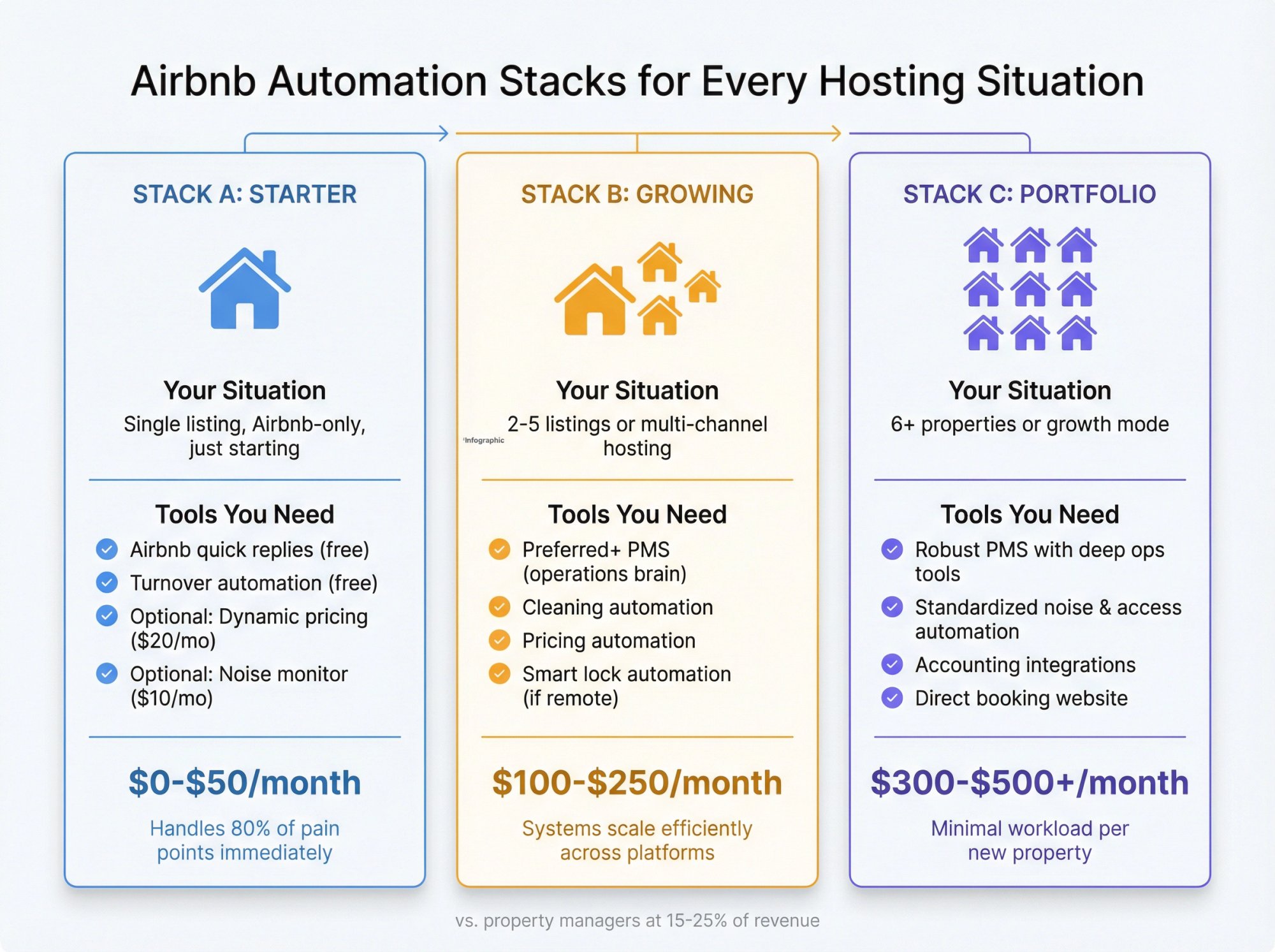
Don't buy everything at once. The minimum viable automation stack based on your situation.
| Your Situation | Automation Stack | Monthly Cost | Why It Works |
|---|---|---|---|
| Stack A: Single listing, Airbnb-only, just starting | • Airbnb quick replies (free) • Turnover automation (free tier) • Optional: Dynamic pricing ($20/month) • Optional: Noise monitor ($10/month) |
$0 to $50 | Lowest complexity, fastest setup, handles 80% of pain points immediately |
| Stack B: 2-5 listings or multi-channel hosting | • Preferred+ PMS (operations brain) • Cleaning automation • Pricing automation • Smart lock automation (if remote) |
$100 to $250 | Eliminates process duplication across platforms. Unified systems scale efficiently |
| Stack C: Portfolio builders (6+ properties or growth mode) | • Robust PMS with deeper ops tools • Standardized noise & access automation • Accounting integrations • Direct booking website |
$300 to $500+ | Reduces per-unit management overhead as you scale. Each new property adds minimal workload |
How to Set Up Airbnb Automation in 48 Hours
Don't overthink this. Pick your stack above and set it up this week.
Day 1: Build Your Communication Backbone (3 to 4 hours)
Morning:
① Write your 8-message template pack (booking confirmation, pre-arrival, check-in, day-of reminder, first-night check, checkout steps, review request)
② Set them up in Airbnb quick replies or your PMS
③ Schedule the automated ones (pre-arrival at 48 hours, check-in at 24 hours, etc.)
Afternoon:
④ Add house rules highlights to your automated check-in message (quiet hours, max guests, parking location, trash day)
⑤ Test the entire sequence by creating a fake reservation (if possible) or walking through the logic
Deliverable: You're no longer writing repetitive messages manually. Response time improves, consistency improves, and you reclaim your evenings.
Day 2: Automate Turnovers and Access (3 to 4 hours)
Morning:
① Connect your calendar to your turnover automation platform or PMS task system
② Build a photo checklist template for your cleaner (bathroom counters clean, kitchen sink clear, beds made with fresh linens, towels restocked, etc.)
③ Set up same-day turnover alert rules
Afternoon:
④ Install your smart lock if you haven't already (or schedule installation)
⑤ Configure code automation through your PMS or lock manufacturer's integration
⑥ Test the access workflow end-to-end
Deliverable: Every checkout automatically triggers a cleaning workflow with verification. Check-in codes generate and send automatically.
After 48 hours, you've automated the two biggest time drains in self-management. Everything else builds on this foundation.
5 Airbnb Automation Mistakes to Avoid
We see these repeatedly with hosts who tried automation and hated it:
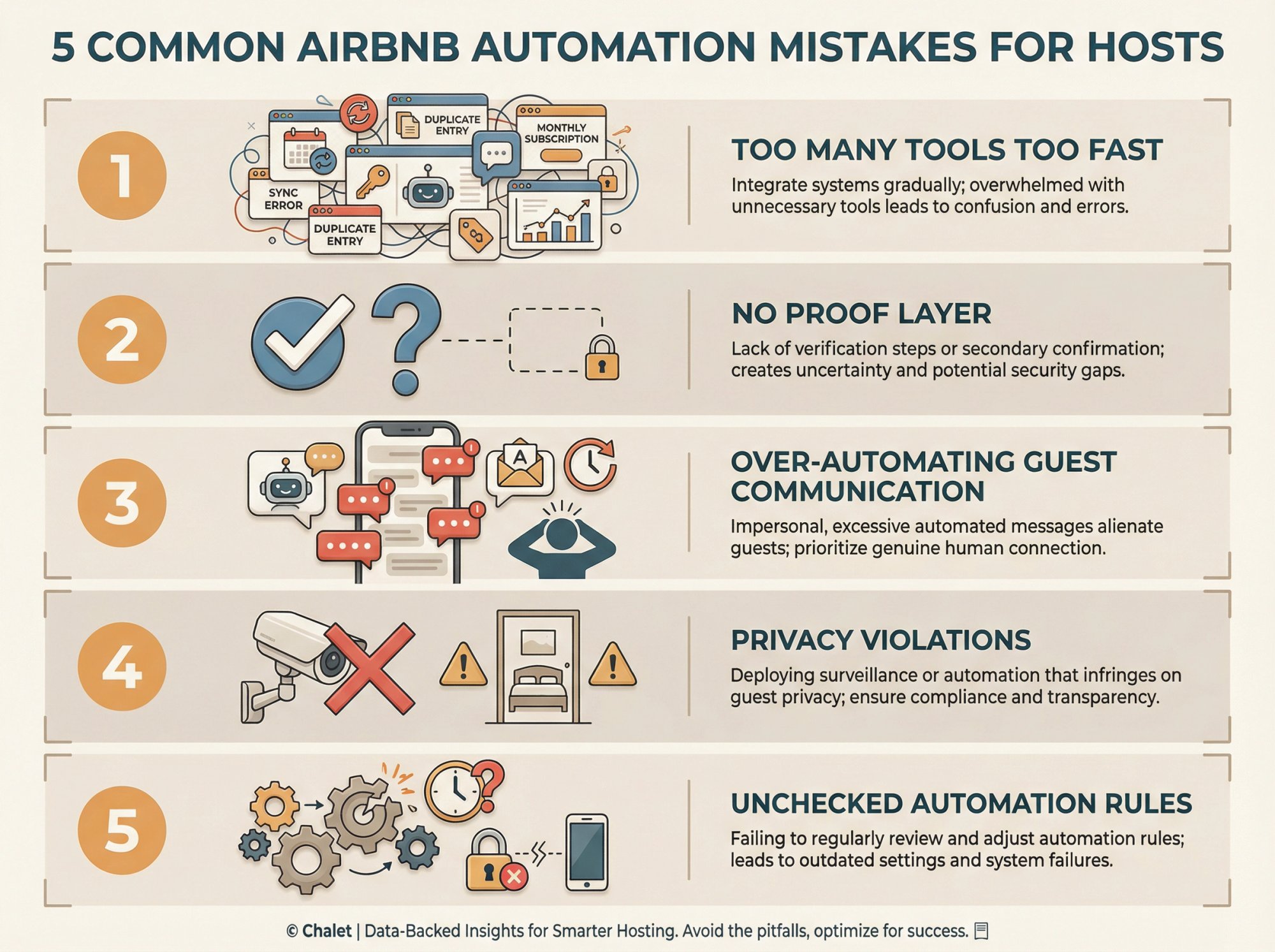
Mistake 1: Too Many Tools Too Fast
The error: Buying six different subscriptions in one week and trying to configure everything simultaneously.
The fix: Start with your biggest pain point (usually turnovers or messaging). Get that working reliably for two weeks. Then add the next layer. Complexity compounds fast when you're troubleshooting five platforms at once.
Mistake 2: No Proof Layer
The error: Automation runs, but you can't verify it actually happened. So you end up "manually checking" everything anyway. That's not automation, that's extra work.
The fix: Every automated task should produce verifiable proof. Cleaning completed? Require checklist photo. Message sent? Check sent history. Code generated? Confirmation email. If your tools don't give you proof, they're not automation tools.
Mistake 3: Over-Automating Guest Communication
The error: Sending so many automated messages that guests feel like they're talking to a robot or getting spammed.
The fix: Automation should handle predictable, repetitive questions (wifi password, check-in steps, checkout instructions). Humans should handle exceptions and unique situations. If a guest asks something specific, don't send them a canned template. Answer them personally. Balance is everything.
Mistake 4: Privacy and Disclosure Violations
The error: Installing indoor cameras (prohibited entirely) or placing noise monitors in bedrooms (not allowed) or forgetting to disclose monitoring devices in your listing.
The fix: Read Airbnb's device policy completely before buying anything. Noise monitors are great tools when used correctly: disclosed in your listing, placed only in common areas, configured to alert you without recording audio. Violating these rules gets your listing suspended.
How Much Does Airbnb Automation Cost Per Month?
Traditional Airbnb property managers charge 15 to 25% of your gross rental income. For a property earning $3,500 monthly, that's $525 to $875 every single month going to the manager.
Your self-management tech stack costs a fraction of that.
Your self-management tech stack costs a fraction of that.
| Portfolio Size | Monthly Tech Costs | vs. Property Manager |
|---|---|---|
| Single listing ($3,500/month revenue) | • PMS/messaging: $30 • Dynamic pricing: $20 • Cleaning coord: $10 • Noise monitor: $10 • Smart lock: $0 (one-time $200) Total: ~$70 |
Property manager would cost: $525 to $875/month Your savings: $455 to $805/month |
| Four listings ($12,000/month combined) | • PMS: $60-$100 • Pricing tool: $60-$80 • Turnover mgmt: $40 • Access automation: included • Monitoring: $40 Total: $200 to $260 |
Property manager would cost: $2,400/month Your savings: $2,140 to $2,200/month |
Plus, dynamic pricing tools typically pay for themselves through better revenue optimization. A $20/month pricing tool that boosts your income by $200/month (which is typical) is a 10x return on investment.
The software investment is real, but it's dramatically cheaper than the alternative and you maintain control over your business.
Airbnb Self-Management vs Property Manager: Cost Comparison
Five years ago, most STR investors used property managers because manual self-management was too labor-intensive. Today, that calculation has completely changed.
What property managers do:
• Respond to guest messages
• Coordinate cleaning and turnovers
• Handle pricing optimization
• Manage check-in and access
• Coordinate maintenance and repairs
• Handle guest issues and emergencies
What automation tools do:
All of the above, except the final rare emergency that requires human judgment. And you still maintain that control yourself.
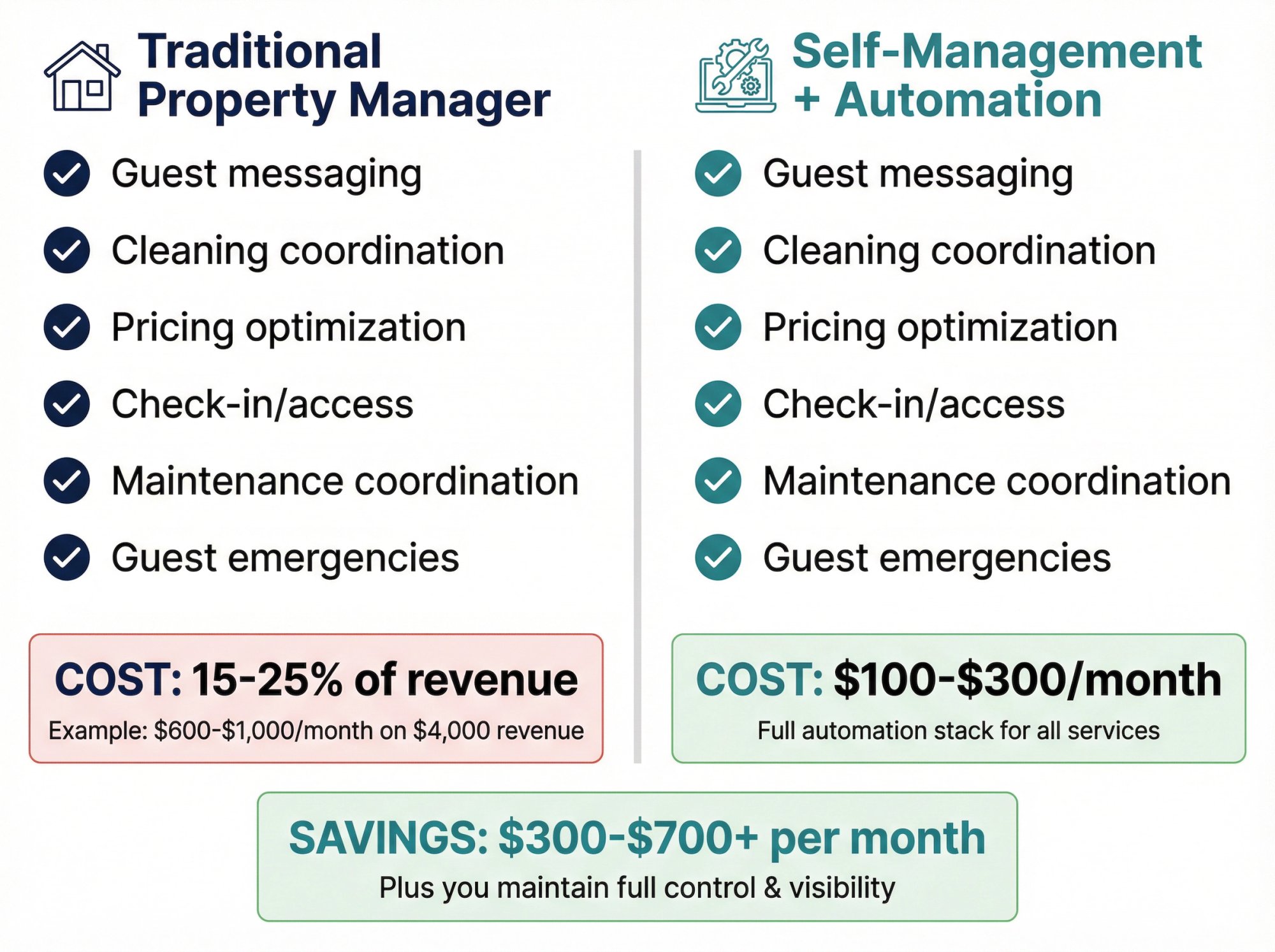
The reality: Many hosts now report spending only a few hours per week actively managing even with multiple properties once automation is in place. The software works 24/7 in the background. You're running a scalable business with profit margins property managers can't match.
According to industry research, the majority of new STR owners are choosing to self-manage with technology rather than hiring traditional management companies. The barrier to entry is lower than ever. You don't need coding skills or a huge budget. These platforms are user-friendly and ROI-positive from month one.
When you might still need a property manager:
• You own 15+ properties and need boots-on-the-ground coordination
• The property is extremely remote and you have no local contacts
• You're dealing with high-maintenance guests (luxury market, concierge-level expectations)
• You simply don't want to deal with operations at all
Otherwise, automation gives you 90% of what a property manager provides at 10% of the cost, and you keep full control and visibility into your business.
If you're considering whether to self-manage, Chalet's free tools can help you model the economics and connect with automation-savvy vendors who make DIY management realistic.
Getting Started with Airbnb Automation (Action Steps)
Don't try to automate everything at once. That's overwhelming and often counterproductive.
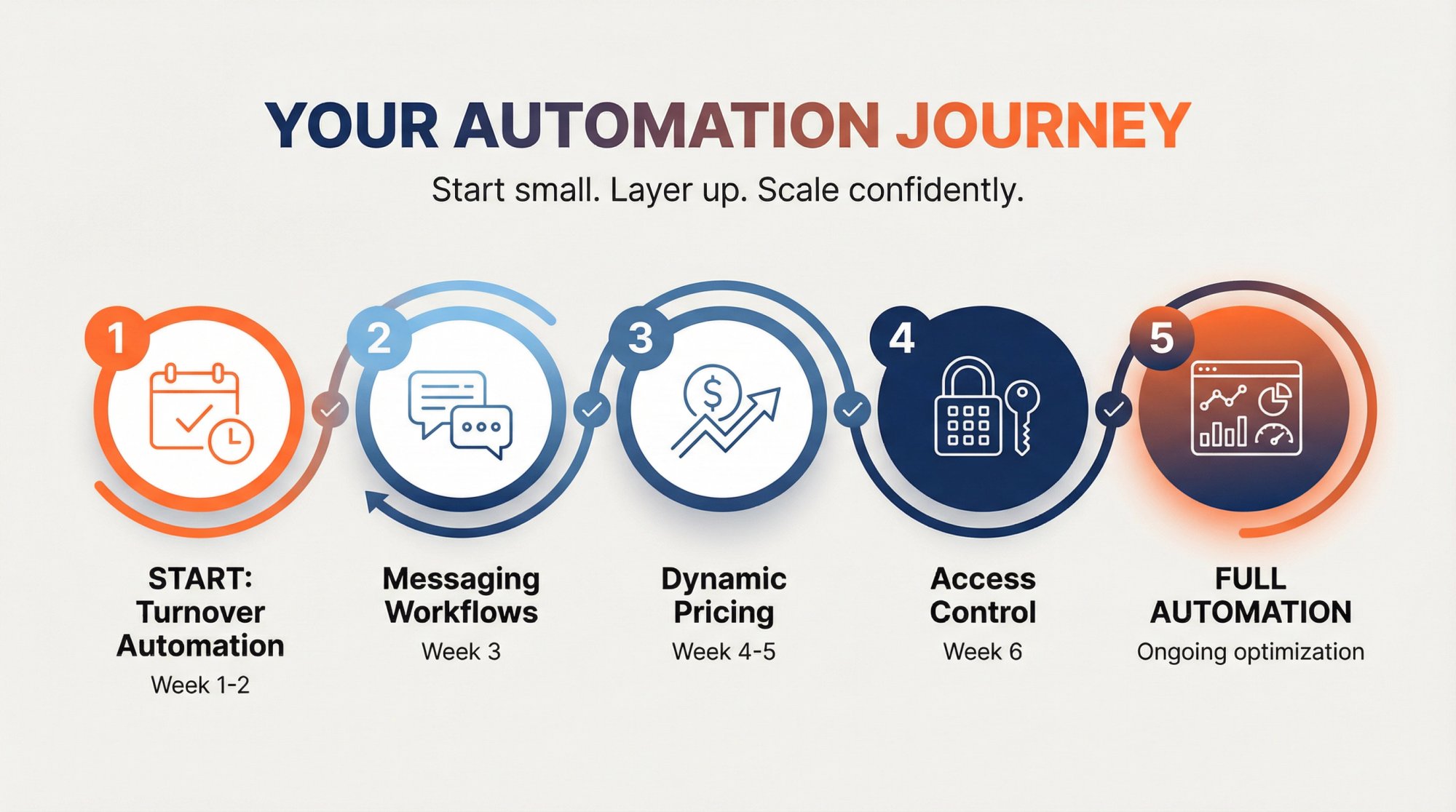
If you're unsure where to start, begin with turnover automation. It's the highest-ROI time saver and prevents the worst operational disaster (guests arriving to dirty property).
Set up turnover automation this week. Get your cleaner using the photo checklist system. Let it run for two weeks. Then add the next layer.
Resources that help:
• Airbnb's Preferred Software Partners directory for vetted PMS options
• Chalet's free market analytics to understand whether your markets justify automation investment
• Chalet's ROI calculator to model cash flow including tech costs
• STR-specialist vendor network for cleaners, handymen, and other service providers
• Local regulation libraries to ensure your automation complies with city rules
If you're buying your first STR or looking to scale your portfolio, connect with Chalet to access the data and vendor network that makes self-management with automation actually work.
The goal isn't to remove yourself completely. It's to focus your time on strategic decisions and exceptional guest experiences while automation handles the repetitive operational work.
You'll know you've succeeded when a guest checks out, leaves a 5-star review, and you realize you never manually touched that reservation once.
Airbnb Automation Tools FAQ
How much does a full Airbnb automation stack cost per month?
For a single listing, expect $50 to $150 per month total depending on which tools you set up. For multiple properties, costs scale but remain dramatically lower than property managers (who charge 15 to 25% of revenue). A typical four-property setup might cost $200 to $300 monthly for all software combined.
Do I need automation if I only have one Airbnb listing?
You don't need it, but you'll save 10 to 20 hours monthly and likely earn 15 to 25% more revenue with dynamic pricing alone. Even single-listing hosts benefit enormously from automated messaging and turnover coordination. Start with Airbnb's free quick replies and free-tier automation platforms. That's zero cost and immediate time savings.
What's the most important automation tool to start with?
Turnover automation (cleaning and inspection) is the highest-ROI first step. It prevents your biggest operational risk (guest arriving to dirty property) and saves the most coordination time. Set up automated cleaning coordination, require photo checklist completion, and watch your stress level drop.
Can I automate Airbnb without a property management system?
Yes, especially for one or two listings on Airbnb only. Use Airbnb's built-in quick replies and scheduled messages, add a pricing tool, and use turnover automation for cleaning coordination. A PMS becomes valuable when you list on multiple platforms (Vrbo, Booking.com) or manage 3+ properties.
Are smart locks required for Airbnb automation?
Not technically required, but self check-in is now a standard guest expectation and an Airbnb search filter. Smart locks with automated code generation eliminate key handoffs, reduce coordination time, and enable truly remote management. For 1 to 2 listings you can manage codes manually. For 3+ properties or remote hosting, automated access control becomes essential.
How do I automate guest messaging without sounding like a robot?
Write templates in your natural voice with personality. Use placeholders for guest-specific details (names, dates, arrival time) so messages feel personal. Keep automated messages focused on information delivery (wifi password, checkout steps), but respond personally to unique questions. The key is automating predictable communication while staying human for exceptions.
What's the difference between a PMS and a channel manager?
A channel manager syncs your calendars across booking platforms to prevent double-bookings. A property management system (PMS) includes channel management plus unified inbox, automated messaging, task management, team coordination, and integrations with other tools. Think of a PMS as your complete operations platform, while a channel manager only handles calendar sync.
Can automation tools help me get more 5-star reviews?
Indirectly, yes. Automated messaging ensures guests always receive check-in instructions on time, checkout reminders prevent rule violations, and digital guidebooks preempt questions that could otherwise frustrate guests. Cleaner scheduling automation means properties are consistently ready. Better operations lead to better guest experiences, which lead to better reviews.
Are noise monitors legal in Airbnb rentals?
Yes, but with strict conditions. Airbnb allows noise decibel monitors that measure sound levels without recording audio, as long as you disclose them in your listing and they're not in bedrooms, bathrooms, or sleeping areas. Indoor security cameras that capture video/audio are completely prohibited. Outdoor cameras at entrances are allowed with disclosure.
How do dynamic pricing tools actually work?
They connect to your listing via API and analyze real-time data including local supply and demand, competitor pricing, seasonality, local events, booking lead time (how far in advance), historical performance of your property, and market trends. The algorithm adjusts your nightly rate automatically based on these factors, typically updating prices daily or even more frequently during high-demand periods.
Can I use automation tools with Vrbo and Booking.com or just Airbnb?
Most automation tools work across multiple platforms. Property management systems on Airbnb's Preferred Partners list are specifically designed for multi-channel hosting. They sync calendars, combine inboxes, and apply your automation rules across Airbnb, Vrbo, Booking.com, and often direct bookings too.
What happens if my smart lock battery dies or Wi-Fi goes down?
Have a backup plan. Most hosts keep a traditional lockbox with a physical key hidden on the property. Communicate the backup access method in emergencies only. Quality smart locks also warn you when battery is getting low (usually months in advance). Some models include 9V battery emergency jumpstart capability from outside the door.
How long does it take to set up a full automation stack?
You can get the essentials running (messaging automation and turnover coordination) in 48 hours or less. Adding pricing automation, smart locks, and a PMS might take another few days to a week depending on complexity and how many properties you're configuring. Most hosts get core automation running within their first week of focused work.
Do automation tools work for luxury or high-end short-term rentals?
Absolutely. Automation handles operational efficiency regardless of price point. High-end hosts often add concierge platforms that automate upsell offerings (private chef, airport pickup, spa services) and guest experience customization. The fundamentals (messaging, pricing, turnover, access) are the same. Premium properties just layer on additional hospitality automation.
Will automation replace the personal touch that makes my listing special?
No. Automation handles predictable, repetitive tasks so you can focus energy on meaningful personal interactions. Answer unique guest questions personally. Accommodate special requests. Provide local recommendations. Automation frees you from writing "here's the wifi password" 100 times so you can actually deliver hospitality where it matters.
Can I build my own automation with Zapier or IFTTT instead of buying tools?
Technically possible but rarely worth it. Building custom workflows requires ongoing maintenance, breaks when APIs change, and your time is better spent elsewhere. Purpose-built STR automation tools are inexpensive (often $20 to $50/month), fully supported, and continuously updated. Unless you're a developer who enjoys this work, buy the tools instead of building them.
How do I know which automation tools actually work and which are overhyped?
Look for tools on Airbnb's Preferred and Preferred+ Software Partners list. These vendors undergo quality and security reviews and maintain higher API integration standards. Also check for free trials, read reviews from hosts similar to your situation (single listing vs. portfolio), and start with one tool at a time to verify ROI before adding more.
Does Chalet sell or recommend specific automation tools?
We don't sell automation software. Chalet provides free market analytics, ROI calculators, and a vetted vendor network for STR-related services (agents, lenders, insurance, cleaners). We help you make smarter acquisition and operations decisions, then connect you with professionals who can put your automation strategy into action. We may earn referral fees from vendor partnerships, but we don't push specific software platforms.
Ready to build your automation stack? Start with Chalet's free analytics tools to validate your market, then connect with STR-specialist vendors who understand automation and systems integration.